Astro's Markdown Style Guide
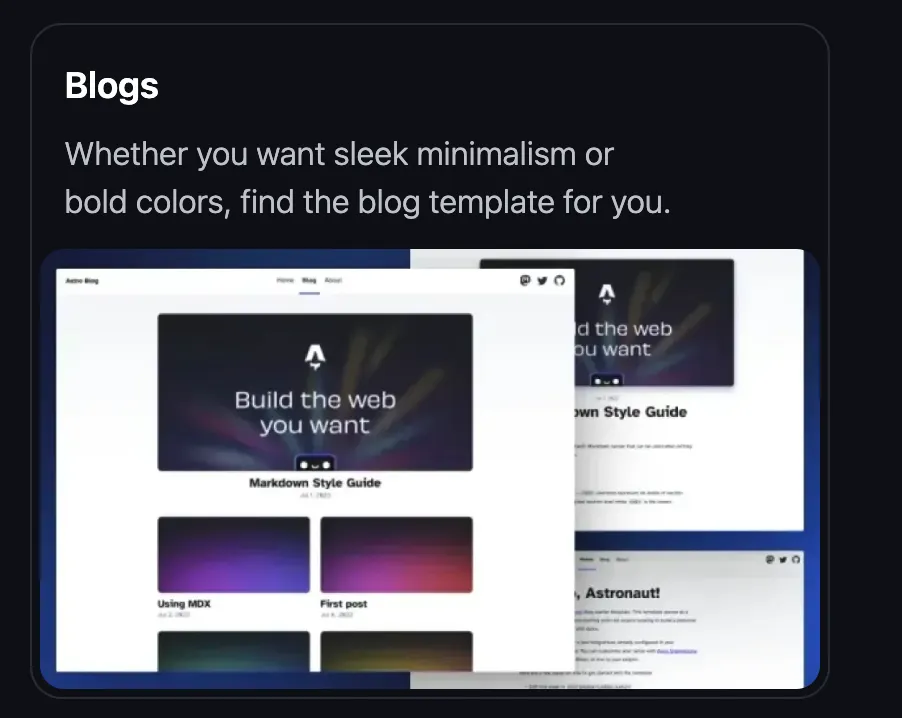
Source: https://astro.build/themes/
The starting seed of this blog was a free theme template that I found on Astro’s site 🔗 two to three years ago. I’ve just tried to find it back again but the only remnant I can find is that they are using the theme’s image as the entry point for their Blog Themes 🔗 as seen here.
Luckily I had not modified the README file yet and that gives credit for the theme as being “based off of the lovely Bear Blog 🔗”. And I would like to second that credit because I found a number of elements in the template design to be extremely “elegant”.
Specifically, the text decoration (bold and underline) on the active page in the header navigation menu looks (to me at least!) like it is being dynamically applied with JavaScript but comes for free with CSS at build time. Astro builds each and every page separately and therefore knows, which route should have which menu item decorated so, as you click through, all you are seeing is pre-built styled content that appears to move in synchronisation with the URL/route changing.
In the same sample blog, there was a basic Markdown syntax and style guide that I feel warrants being copied across. I am writing each of these posts in markdown or MDX (more on MDX in this post) and, if nothing else, I will have a place I can return to quickly to remind myself of how to style content in each post by coming back here to re-read and re-member.
Headings
The following HTML <h1>—<h6> elements represent six levels of section headings. <h1> is the highest section level while <h6> is the lowest.
H1 Headline
H2 Related section of interest
H3 Diving further into the rabbit hole
H4 It’s getting dark in here
H5 And I thought I was detailed
H6 Jeez, we are well below the level of 5 Whys at this stage
Point of further note - as I understand things, it is best not to skip Heading levels in any of your pages if you want Google and others to see your page as “well written”. In other words make sure <h2>s follow <h1>s, <h3>s follow <h2>s, and so on. HTML is, after all, all about structure and semantics, if the specification recognises that headings are hierarchical then don’t break the hierarchy…and, yes, I recognize that this post now has two <h1> headings and I’ve gone against my own advice immediately.
Paragraph
This is “just” text in a paragraph - no need to include any #s, just type. In order for you to see it rendered here as a complete paragraph I have to type a few words or resort to Latin for content, e.g. ipso facto, quod erat demonstrandum, to fill the space. But really it’s just text that you want to appear as a paragraph; nothing more or less complicated than that.
Images
Syntax
If you want to insert an image in the text then just put the following markdown inline with the rest of the text.
Output

Blockquotes
If you’re quoting from another source then use the blockquote element. If you want to add a citation to credit the source then this should be included in a footer, cite element or, optionally, through the use of annotations and abbreviations (see below).
Blockquote without attribution
Syntax
> Tiam, ad mint andaepu dandae nostion secatur sequo quae.
> **Note** that you can use _Markdown syntax_ within a blockquote.
Output
Tiam, ad mint andaepu dandae nostion secatur sequo quae.
Note that you can use Markdown syntax within a blockquote.
Blockquote with attribution
Syntax
> Don't communicate by sharing memory, share memory by communicating.<br />
> — <cite>Rob Pike[^1]</cite>
Output
Don’t communicate by sharing memory, share memory by communicating.
— Rob Pike1
List Types
Ordered (numbered) List
Syntax
1. First item
2. Second item
3. Third item
Output
- First item
- Second item
- Third item
Unordered (bulleted) List
Syntax
- List item
- Another item
- And another item
Output
- List item
- Another item
- And another item
Nested list
Syntax
- Fruit
  - Apple
  - Orange
  - Banana
- Dairy
  - Milk
  - Cheese
Output
- Fruit
- Apple
- Orange
- Banana
- Dairy
- Milk
- Cheese
Task lists
Syntax
- [x] Do this
- [ ] Still got to do that
Output
- Do this
- Still got to do that
Tables
Note that I often see markdown table examples where the horizontal -s or vertical |s don’t line up very well. I understand this is because the parser that reads them before rendering is very lenient.
Turns out that, as long as each row has the same number of vertical separators (|s), the ugliest looking table in markdown should render perfectly in HTML.
As an example - the two markdowns below will effectively yield the same result even if you can read one much more easily in markdown form than the other. I suspect there’s an art in counting spaces between characters if you want the raw markdown file to be readable, especially if you have many columns. Unless you look for help from tooling such as Prettier with --prose-wrap, as one example.
In the end, whatever works for you when authoring is your choice. Just know that choices exist.
Syntax
| Italics   | Bold     | Code   |
| --------- | -------- | ------ |
| _italics_ | **bold** | `code` |

...will render the same way as this...

| Italics   | Bold     | Code   |
| -- | -- | -- |
| _italics_ | **bold** | `code` |
Output
| Italics | Bold | Code |
|---|---|---|
| italics | bold | code |
Utilities that may be helpful
Syntax
- Use ~~ to ~~wipeout~~ strike through text
- [^2] for adding a footnote and then...clicking on the link will take you to the footnote, which itself has a friendly return link to return you to the footnote in the text
- [^labels] you can use whatever you want as a label in the markdown

For horizontal rules, three or more hyphens or asterisks on a line will render as a horizontal line across the screen:
--- or ***

Conventionally the footnotes themselves go at bottom of the markdown file
[^2]: Add the text that you want to appear at the bottom of the page.  Conventionally you'd also place this text at the bottom of the markdown page as well.
[^labels]: can be text as well as numbers, up to you.
Output
- Use ~~ to
wipeoutstrike through text - [^2] for adding a footnote and then…clicking on the link will take you to the footnote, which itself has a friendly return link to return you to the footnote in the text
- 2
[^labels]will render as a number
- For horizontal rules, three or more hyphens or asterisks on a line will render as a horizontal line across the screen: --- or ***
Including Code - in one block
Syntax
One can use 3 backticks ``` on a new line, write the code snippet, and close with 3 backticks on another new line. Optionally specify the language right after the opening backticks so the renderer knows how to highlight it. Astro uses Shiki 🔗 built in to give us syntax highlighting out of the box and for free for languages like html, javascript, css, markdown, typescript, txt, bash, etc.
```html
<!doctype html>
<html lang="en">
  <head>
    <meta charset="utf-8" />
    <title>Example HTML5 Document</title>
  </head>
  <body>
    <p>Test</p>
  </body>
</html>
```
Output
<!doctype html>
<html lang="en">
  <head>
    <meta charset="utf-8" />
    <title>Example HTML5 Document</title>
  </head>
  <body>
    <p>Test</p>
  </body>
</html>
Including Code - inline with ‘normal’ text
Syntax
Wrap short technical references in backticks: var foo = 1 becomes var foo = 1.
Useful for referencing element names, function names, file paths, or short literal values inline with prose.
Output
The HTML element <code> is for inline code; <pre><code> is for block code.
File paths like /src/styles/global.css look better in monospace.
Miscellany - abbr, sub, sup, kbd, mark
For a number of edge cases when you want to feel like you’re actually writing in Microsoft Word rather than markdown.
- Abbreviation
- Subscript
- Superscript
- Keyboard
- Marked text
Further points of note - these markdown “elements” yield HTML with specific semantics, e.g. marked text for highlighting a search result rather than permanently emphasising a word or phrase. So use each wisely having understood that you’ve got your semantics right!
Syntax
<abbr title="Graphics Interchange Format">GIF</abbr> is a bitmap image format.

H<sub>2</sub>O

X<sup>n</sup> + Y<sup>n</sup> = Z<sup>n</sup>

Press <kbd>CTRL</kbd> + <kbd>ALT</kbd> + <kbd>Delete</kbd> to end the session.

Most <mark>salamanders</mark> are nocturnal, and hunt for insects, worms, and other small creatures.
Output
GIF is a bitmap image format.
H2O
Xn + Yn = Zn
Press CTRL + ALT + Delete to end the session.
Most salamanders are nocturnal, and hunt for insects, worms, and other small creatures.
Footnotes
-
The above quote is excerpted from Rob Pike’s talk 🔗 during Gopherfest, November 18, 2015. ↩
-
watch out - the footnotes come with a free return to the top of the page but, if you have a sticky header then don’t forget to add scroll-padding-top to your CSS calculations so the user is not returned to text under a sticky header! ↩